

unRarX 2.2
unRarX 2.2 for macOS: Compressed archive files help users reduce file size and combine multiple files into a single package. Among these formats, RAR archives remain widely used, especially for large downloads, software distribution, and cross-platform file sharing. However, macOS does not support RAR files natively. As a result, Mac users must rely on third-party extraction tools.
Here, unRarX 2.2 for macOS offers a simple and free solution. It allows users to extract RAR archives without complex settings or paid licenses, making it a popular choice for basic archive handling.
unRarX 2.2 for macOS Overview
unRarX 2.2 for macOS is a free, lightweight utility developed specifically to extract RAR archives on Mac systems. It uses a Cocoa-based graphical interface built around the official unrar command-line tool. Instead of adding unnecessary features, unRarX focuses entirely on reliable RAR extraction.
Although developers now consider unRarX a legacy application, many users still rely on it, especially on older Intel-based Macs. Therefore, this article delivers a balanced, technically accurate, and SEO-optimized overview of unRarX 2.2, including its features, updates, system requirements, pros, cons, and real-world usability on macOS.
Wondershare Repairit 6.5.15.10 for macOS
Key Features of unRarX 2.2 for macOS
unRarX follows a minimalistic design philosophy. Because of this, its feature set remains limited but clearly defined, which explains why the tool stayed popular for many years.
RAR Archive Extraction Only
unRarX extracts RAR files exclusively. It does not create archives, nor does it attempt to support every compression format. As a result, the application stays lightweight and easy to use.
Support for Multi-Part RAR Archives
Large downloads often arrive in multiple RAR parts, such as .part1.rar and .part2.rar. unRarX detects these multi-volume archives and automatically processes them when all parts exist in the same folder.
Password-Protected RAR Files
unRarX also handles password-protected RAR archives. When users open an encrypted file, the application requests the correct password before starting the extraction.
Simple Drag-and-Drop Interface
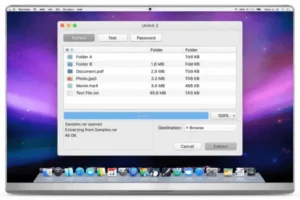
The application uses a basic Cocoa interface that emphasizes simplicity. Users can drag and drop RAR files directly onto the unRarX window or app icon, which makes the extraction process fast and straightforward.
PAR2-Based Repair Support
unRarX includes par2 tools that help recover damaged or incomplete RAR archives when parity files are available. Consequently, this feature proves useful for repairing corrupted downloads.
Lightweight and Low Resource Usage
Compared to modern archive managers, unRarX has a very small application size. Moreover, it consumes minimal system resources, which makes it suitable for older Macs with limited hardware.
Works Alongside Finder
After extraction, unRarX saves files as standard folders that appear immediately in Finder. Users can then manage, move, or delete the extracted content like any other macOS file.
WinZip for Mac 12.0
What’s New in unRarX 2.2 for macOS
unRarX version 2.2 did not introduce major new features. Instead, the developers focused on maintenance, stability, and compatibility improvements.
Universal Binary Build
Version 2.2 introduced a Universal Binary, which allowed unRarX to run on both PowerPC and Intel-based Macs. At the time, this change supported Apple’s hardware transition and later enabled limited compatibility on newer systems through translation layers.
Updated unrar and par2 Tools unRarX 2.2 for macOS
The developers updated the bundled unrar and par2 command-line tools. Consequently, extraction reliability improved, especially when users worked with damaged or incomplete archives.
Sparkle Auto-Update Integration
unRarX 2.2 added Sparkle auto-update support, allowing the application to notify users about available updates and simplifying long-term maintenance.
Overall, version 2.2 emphasized stability and long-term usability rather than modern interface redesigns or feature expansion.
Compatibility and macOS Support (Important Note)
Developers originally built unRarX 2.2 for older versions of Mac OS X. While some users still manage to run it on newer macOS versions using compatibility modes or Rosetta, reliability on Ventura, Sonoma, or Sequoia remains inconsistent and unofficial.
Likewise, Apple Silicon support for M1, M2, and M3 Macs has not been officially confirmed. Performance and stability may vary depending on macOS version, system configuration, and security restrictions.
Best-Fit Use Cases
Therefore, unRarX 2.2 works best for:
- Older Intel-based Macs
- Legacy macOS environments
- Users who need a simple RAR-only extractor
System Requirements for unRarX 2.2 for macOS
Minimum Requirements
- Operating System: macOS 10.4 Tiger to macOS 10.11 El Capitan
(Later versions may require workarounds) - Processor: Intel-based Mac (Universal Binary; Apple Silicon not officially supported)
- Memory (RAM): 1–2 GB
- Storage: 20–50 MB free disk space
Recommended Requirements
- Operating System: Latest macOS version that can run the app reliably
- Processor: Intel Mac
- Memory (RAM): 4 GB or more
- Storage: SSD with at least 50 MB free
These requirements accurately reflect the lightweight nature of unRarX and avoid misleading hardware claims.
Microsoft Office LTSC Standard for Mac
Pros and Cons of unRarX 2.2 for macOS
Pros
Free to Use
unRarX costs nothing, which makes it attractive for users who want RAR extraction without paying for software.
Extremely Simple Interface
The drag-and-drop design allows even beginners to extract files without technical knowledge.
Lightweight and Fast on Older Systems
Because of its small size and limited scope, unRarX performs well on older Intel-based Macs.
Reliable RAR Extraction
On supported systems, the application extracts standard and multi-part RAR archives consistently.
Cons
Legacy Application
unRarX receives updates very infrequently and no longer follows modern macOS development standards.
No Archive Creation
The tool cannot create RAR or ZIP files, which limits its functionality.
Limited Format Support
unRarX focuses almost entirely on RAR files and supports very few additional formats.
Inconsistent Compatibility on New macOS Versions
On Ventura, Sonoma, and Apple Silicon systems, stability is not guaranteed.
Use Cases and Target Audience unRarX 2.2 for macOS
unRarX 2.2 suits users who:
- Run older Intel-based Macs
- Only need to extract RAR files
- Prefer a free and lightweight solution
- Maintain legacy workflows
However, users on modern macOS systems who require guaranteed compatibility and regular updates should consider newer alternatives.
Apple Creator Studio macOS
Conclusion: unRarX 2.2 for macOS
unRarX 2.2 for macOS remains a simple and lightweight RAR extraction tool that served Mac users reliably for many years. Its straightforward interface, support for multi-part and password-protected archives, and minimal system requirements still make it useful in legacy environments.
Nevertheless, users should recognize that unRarX is a legacy application. Modern macOS compatibility remains inconsistent, and updates are rare. Therefore, users running the latest macOS versions may achieve better results with alternatives such as The Unarchiver or Keka.
In conclusion, unRarX 2.2 continues to deliver value for older systems and basic RAR extraction needs, while modern Mac users should evaluate newer tools based on their workflow and system requirements.
Homepage: https://worldmacpc.com/
Leave a Reply