
Mac Software
Are you tired of apps asking for monthly payments or trials that expire? If you are looking to save money while still using professional-grade tools on your Mac, you’ve come to the right place. This article will explore Mac software without subscription, highlighting the best free apps for productivity, design, video editing, audio, and utilities. By the end of this guide, you’ll know which apps to install to boost your workflow without spending a dime.
Why Choose Mac Software Without Subscription?
Subscriptions are convenient but can add up over time. Choosing software that doesn’t require a subscription provides several advantages:
- Cost efficiency: No upfront or recurring fees.
- Longevity: No worrying about a subscription expiring.
- System performance: Most free apps are lightweight and work well on older Macs.
- Simplicity: Install once, use forever.
Older Mac users especially benefit from these free tools, as they typically use less RAM and CPU, keeping your system running smoothly.
Best Free Productivity Mac Software
1. LibreOffice
Category: Productivity
LibreOffice is a full office suite that includes alternatives to Microsoft Word, Excel, and PowerPoint. It is completely free and open-source.
Features:
- Word processing, spreadsheets, and presentations.
- Templates for academic, business, and personal use.
- Offline use with minimal system requirements.
Tips:
- Customize your toolbar to access frequently used tools.
- Use templates to save time on standard document types.
Use Case: Students can submit assignments and professionals can draft reports without paying for Microsoft 365.
2. Notion (Free Plan)
Category: Productivity / Organization
Notion is an all-in-one workspace for notes, databases, and project management. The free plan is fully functional for personal use.
Features:
- Kanban boards, calendars, and task lists.
- Lightweight offline mode.
- Syncs across Mac, iPhone, and iPad.
Tips:
- Use templates for workflow organization.
- Combine with Todoist for advanced task management.
Use Case: Freelancers can manage multiple clients efficiently, keeping all project data organized in one place.
3. Todoist (Free Plan)
Category: Task Management
Todoist helps you track tasks, set priorities, and organize projects. The personal plan is completely free.
Features:
- Cross-platform sync.
- Simple interface that doesn’t slow down your Mac.
- Reminders and priority labels.
Tips:
- Integrate with calendar apps to schedule tasks.
- Use project labels for categorization.
Use Case: Remote workers can manage their daily and weekly tasks without subscribing to paid tools.
Best Free Design & Creativity Mac Software
4. GIMP
Category: Image Editing
GIMP is an open-source alternative to Photoshop, ideal for graphic design and photo editing.
Features:
- Layers, brushes, and filters.
- Supports multiple file formats including PSD, JPEG, and PNG.
- Lightweight compared to paid alternatives.
Tips:
- Use plugins to extend functionality.
- Organize layers to keep complex designs manageable.
Use Case: Graphic designers can create social media graphics and marketing materials for free.
5. Inkscape
Category: Vector Graphics
Inkscape is a free vector design tool, perfect for creating logos, illustrations, and scalable graphics.
Features:
- Supports SVG editing, shapes, and text tools.
- Lightweight and beginner-friendly.
- Compatible with other design tools for file export.
Tips:
- Use layers to manage complex illustrations.
- Combine with GIMP for bitmap + vector projects.
Use Case: Small businesses can create logos, banners, and promotional materials without paying for Adobe Illustrator.
6. Krita
Category: Digital Painting / Drawing
Krita is a free digital painting software optimized for creative work on Mac.
Features:
- Advanced brushes, layers, and animation support.
- Compatible with pen tablets.
- Lightweight on system resources.
Tips:
- Utilize pre-made brush packs for efficiency.
- Explore the animation module for short clips.
Use Case: Students and hobbyists can practice digital art and create illustrations without buying Corel Painter or Photoshop.
Free Video & Audio Mac Software
7. DaVinci Resolve (Free Version)
Category: Video Editing
DaVinci Resolve is professional-grade video editing software with a free version suitable for most content creators.
Features:
- Multi-track editing, color correction, and visual effects.
- High-resolution exports up to 4K.
- GPU acceleration for better performance.
Tips:
- Keep projects small on older Macs for smoother editing.
- Use proxy files to speed up workflow.
Use Case: YouTubers and indie filmmakers can edit professional-quality videos without paying for Premiere Pro.
8. Audacity
Category: Audio Editing
Audacity is a free, open-source audio recording and editing tool.
Features:
- Multi-track editing, effects, and noise reduction.
- Exports in WAV, MP3, and other formats.
- Lightweight and stable.
Tips:
- Record podcasts or voiceovers directly.
- Use the noise reduction feature for cleaner audio.
Use Case: Podcasters can produce high-quality audio content without subscribing to Adobe Audition.
9. OBS Studio
Category: Live Streaming / Recording
OBS Studio is free software for screen recording and live streaming.
Features:
- Capture screen, webcam, and audio simultaneously.
- Stream directly to YouTube, Twitch, or Facebook Live.
- Low system impact on Macs.
Tips:
- Use lightweight scenes to reduce CPU usage.
- Test recording settings before live sessions.
Use Case: Educators and content creators can deliver live tutorials without paid streaming software.
Mac Creative Tools: Best Apps for Designers, Video Editors & Musicians
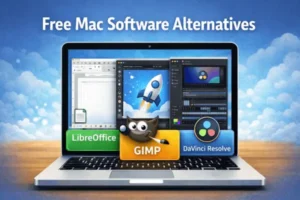
Utility Mac Software
10. AppCleaner
Category: System Maintenance
- Removes apps completely, including hidden files.
- Lightweight and fast.
- Tip: Regularly uninstall unused apps to free up space.
11. The Unarchiver
Category: File Management
- Extracts compressed files in ZIP, RAR, 7z, and more.
- Lightweight, simple interface.
- Tip: Keeps downloads organized and saves time.
12. Rectangle
Category: Window Management
- Snap windows using keyboard shortcuts.
- Lightweight, replaces paid apps like Magnet.
- Tip: Ideal for multitasking with multiple windows open.
Comparison Table: Free vs Paid Mac Software
| Function | Free Software | Paid Alternative | Notes |
|---|---|---|---|
| Office | LibreOffice | Microsoft 365 | Free, offline, lightweight |
| Image Editing | GIMP | Photoshop | Fully functional for most tasks |
| Vector Design | Inkscape | Illustrator | Open-source, scalable graphics |
| Digital Painting | Krita | Corel Painter | Free, pen tablet support |
| Video Editing | DaVinci Resolve (Free) | Premiere Pro | Pro color grading |
| Audio Editing | Audacity | Adobe Audition | Multi-track & effects |
| Window Management | Rectangle | Magnet | Efficient multitasking |
Tips for Using Free Mac Software
- Install only necessary apps to keep your Mac fast.
- Regularly update apps to maintain security and stability.
- Check system requirements, especially for video/audio tools.
- Combine multiple free apps for advanced workflows.
- Use folders or tags to organize apps by category for efficiency.
FAQs About Mac Software Without Subscription
Q: Are these apps truly free?
Yes, all listed apps are free to use. Some accept optional donations.
Q: Will free apps slow down my Mac?
Most are lightweight and optimized for both new and older Macs.
Q: Can these apps be used professionally?
Yes, tools like DaVinci Resolve and GIMP are widely used by professionals.
Q: Do I need internet for these apps?
Most work offline; apps like Notion and OBS may need internet for syncing or streaming.
Q: Are these apps safe to install?
Yes, all recommended apps are trusted, widely used, and community-supported.
Q: Can free software replace paid subscriptions?
For most users, yes. Combining free apps strategically can cover nearly all paid software needs.
WinRAR for macOS 7.12 RAR for Mac
Conclusion
Finding Mac software without subscription is easier than ever. By installing the apps in this guide, you can:
- Boost productivity with LibreOffice, Notion, Todoist
- Enhance creativity with GIMP, Inkscape, Krita
- Edit video and audio professionally with DaVinci Resolve and Audacity
- Keep your Mac organized and fast with AppCleaner, The Unarchiver, Rectangle
These tools are free, lightweight, and highly effective, allowing you to fully utilize your Mac without paying for subscriptions. Start installing these apps today and enhance your Mac experience.
Homepage: https://worldmacpc.com/
Leave a Reply