
BeLight Art Text 4.5.8
BeLight Art Text 4.5.8 Multilingual macOS is a professional typography and graphic design application developed by BeLight Software. The software is specifically designed for macOS users who want to create high-quality text effects, 3D typography, logos, icons, banners, and promotional graphics without using complex full-scale design suites.
In modern digital publishing, typography is no longer just about selecting a font. It defines brand identity, improves visual hierarchy, and increases user engagement. Whether you run a blog, manage a YouTube channel, design marketing materials, or build a small business brand, strong visual text elements make a measurable difference.
BeLight Art Text 4.5.8 focuses entirely on advanced text styling and creative typography. Instead of trying to replace full layout tools, it specializes in what it does best: fast, template-based, visually rich text design optimized for macOS.
Highlights of BeLight Art Text 4.5.8
- Advanced 2D and 3D typography engine
- Large collection of ready-made templates and materials
- Vector-based output for scalable designs
- Multiple export formats including PNG, JPEG, PDF, and SVG
- Optimized performance for modern macOS systems
In short, BeLight Art offers professional text design capabilities in a streamlined and accessible interface.
BeLight Art Text 4.5.8 Overview and Download Information
BeLight Text 4.5.8 Multilingual macOS is distributed through official channels and the Mac App Store. It is a paid application, though some feature sets or additional design packs may require in-app purchases depending on the version.
Before installing, always ensure your Mac meets the official system requirements. This ensures stable performance and access to all features.
Key Features of BeLight Art Text 4.5.8
1. Advanced 3D Text Engine
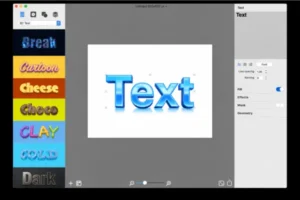
One of the most powerful components of BeLight Art Text 4.5.8 is its real-time 3D text rendering engine.
Users can:
- Adjust depth and extrusion
- Modify lighting angles and intensity
- Apply realistic reflections
- Use metallic, glass, plastic, or embossed materials
- Control bevel and surface smoothness
This allows designers to quickly create cinematic titles, product branding, YouTube thumbnails, or app splash graphics. Unlike heavyweight software that requires complex layer management, BeLight Text keeps the process efficient and intuitive.
2. Extensive Template Library
Templates are a major strength of BeLight Art Text. The software includes professionally designed presets for:
- Logos
- Social media graphics
- Promotional banners
- Buttons
- App icons
- Event posters
Templates are fully customizable. Users can modify fonts, gradients, textures, backgrounds, and shadows to match their brand identity.
This feature is particularly useful for non-designers who want professional results without building everything from scratch.
3. Rich Material and Texture Collection
The application includes a wide range of built-in materials, such as:
- Gold and silver
- Marble and stone
- Wood and metal
- Neon glow
- Glossy plastic
- Carbon fiber
Additionally, users can import custom textures. This flexibility enables the creation of unique and visually striking typography.
Because materials are rendered in real time, users see immediate visual feedback when adjusting surfaces or lighting.
4. Vector-Based Editing and Scalable Output
BeLight Art Text 4.5.8 Multilingual macOS uses vector-based technology. This ensures:
- No quality loss when resizing
- Clean edges for print output
- High-resolution exports
- Professional scalability
Designs can be exported for both digital and print environments without distortion.
5. Professional Typography Controls
Typography customization is the core of BeLight Art
Users can:
- Control kerning, spacing, and line height
- Apply shadows, glows, gradients, and strokes
- Combine multiple layers
- Adjust alignment and text transformations
- Use any system-installed macOS fonts
These controls make it possible to build complex typographic compositions without external tools.
6. Real-Time Preview and Non-Destructive Editing
Every adjustment in BeLight Art Text 4.5.8 is displayed instantly. This includes lighting changes, material swaps, and font modifications.
Because editing is non-destructive, users can experiment freely without permanently altering original text layers.
This significantly improves workflow speed and creative experimentation.
7. Multilingual Interface and Global Usability
As a multilingual release, BeLight Art Text 4.5.8 Multilingual macOS supports multiple interface languages. It also handles diverse character sets, making it suitable for international branding and localization projects.
For global content creators, this is a practical advantage.
8. Multiple Export Formats
The software supports:
- PNG
- JPEG
- TIFF
- SVG
SVG export is particularly important because it allows vector scaling for web or print without losing quality.
What’s New in BeLight Art Text 4.5.8?
Version 4.5.8 focuses on refinement and optimization rather than dramatic redesign.
Improved macOS Compatibility
The application runs smoothly on macOS 10.13 (High Sierra) and later versions. It is optimized for both Intel-based Macs and Apple Silicon systems.
Performance Enhancements
Rendering speed for complex 3D text has been improved. Memory usage is more efficient, especially on modern hardware.
Stability Improvements
Several minor bugs from earlier builds have been fixed. As a result, the software offers a more stable editing experience.
Interface Refinements
Small UI adjustments improve usability and overall workflow clarity.
These improvements make BeLight Art 4.5.8 more reliable for daily professional use.
System Requirements for BeLight Art Text 4.5.8
Before installing BeLight Art Text 4.5.8 Multilingual macOS, verify that your Mac meets the following specifications.
Minimum Requirements
- macOS 10.13 (High Sierra) or later
- Intel Mac or Apple Silicon Mac
- 2 GB RAM
- 500 MB free disk space
- 1280×800 display resolution
Recommended Requirements
- macOS 12 or later
- Apple Silicon (M1/M2) or modern Intel processor
- 8 GB RAM or more
- SSD storage
- Retina display
Meeting recommended specifications ensures smoother 3D rendering and faster exports.
Pros and Cons of BeLight Art Text 4.5.8
Pros
- Powerful 3D typography engine
- Intuitive and beginner-friendly interface
- Large collection of templates and materials
- Vector-based output with SVG export
- Optimized for modern macOS systems
- Ideal for fast logo and promotional text design
Templates and ready-made styles help non-designers create professional-looking graphics quickly.
Cons
- Not a full graphic design suite
- macOS only (no Windows version)
- Some advanced design packs may require additional in-app purchases
- Advanced 3D customization may require practice
Who Should Use BeLight Art Text 4.5.8?
BeLight Art Text 4.5.8 Multilingual macOS is ideal for bloggers, YouTubers, social media managers, small business owners, students, marketing professionals, and graphic designers who need fast, visually compelling typography.
If your primary goal is creating logos, promotional graphics, or stylized headings without complex layout tools, BeLight Art is a strong solution.
Comparison with Full Graphic Design Software
Compared to large creative suites, BeLight Art Text focuses specifically on typography and decorative text effects.
While full-scale design tools provide advanced photo editing and layout management, they often require more learning time. In contrast, BeLight Art 4.5.8 allows users to generate polished results quickly through templates and streamlined controls.
This specialization is one of its biggest strengths.
Frequently Asked Questions (FAQ)
Is BeLight Art Text 4.5.8 free or paid?
BeLight Art is a paid application. Depending on the version, some additional content packs may be available as optional in-app purchases.
Can BeLight Text replace Photoshop for logo design?
For text-focused logos and stylized typography, BeLight Art Text 4.5.8 is highly capable. However, it does not replace full photo editing or advanced layout tools found in broader graphic design software.
Does BeLight Art support Apple Silicon?
Yes. Version 4.5.8 runs on both Intel-based Macs and Apple Silicon devices.
Is BeLight Art suitable for beginners?
Yes. Thanks to templates and real-time preview features, beginners can create professional results without extensive design experience.
Adobe InDesign For Mac 2026 v21.2
Conclusion
BeLight Art Text 4.5.8 Multilingual macOS delivers a focused and powerful typography solution for Mac users. With its advanced 3D engine, rich material library, vector scalability, and optimized macOS performance, it excels at creating eye-catching text designs efficiently.
Although it is not a full graphic design platform, its specialization in text effects makes it extremely effective within its niche. Beginners benefit from ease of use, while experienced designers appreciate precision controls and scalable exports.
If your workflow depends on professional typography, promotional graphics, or branded text elements, BeLight Art remains a reliable and practical choice for macOS.
Homepage: https://worldmacpc.com/
Leave a Reply