
A Better Finder Attributes macOS 7.42
A Better Finder Attributes is a specialized macOS utility designed to give users advanced control over file metadata, timestamps, and file attributes directly from the Finder environment. Developed by Publicspace.net, the application focuses on solving limitations within macOS Finder by allowing users to modify file properties that are otherwise restricted or difficult to manage in bulk.
For many macOS users, file organization becomes increasingly complex over time. Photographers, designers, video editors, archivists, and everyday users frequently encounter situations where file dates are incorrect, metadata needs correction, or attributes must be standardized across hundreds or thousands of files. macOS Finder offers only basic controls, which can slow down workflows when precise file management is required. A Better Finder Attributes addresses this gap by introducing powerful batch processing tools and advanced metadata editing capabilities.
Version 7.42 continues the application’s focus on performance, compatibility, and usability. It improves stability on modern macOS systems while maintaining the lightweight efficiency that has made it popular among professionals and casual users alike. This article provides a detailed and SEO-optimized overview of A Better Finder Attributes, including its core functionality, latest updates, system requirements, advantages, and limitations.
Key Features of A Better Finder Attributes
Advanced Timestamp Modification
One of the most important features of A Better Finder Attributes is the ability to modify file timestamps with precision. macOS typically manages three primary timestamps:
- Creation date
- Modification date
- Last opened date
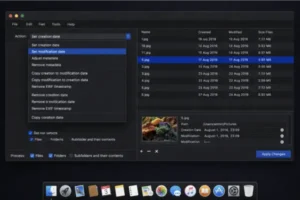
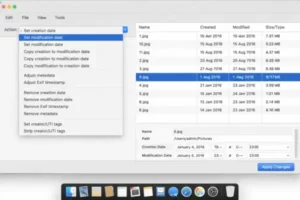
However, Finder does not provide direct tools for editing these values in bulk. A Better Finder Attributes allows users to adjust timestamps individually or across large groups of files. This is particularly useful for photographers importing images from multiple devices, users restoring backups, or professionals organizing archives where chronological accuracy matters.
Additionally, users can shift timestamps by specific time intervals, synchronize dates across files, or copy timestamp information from one file to another. These options significantly improve efficiency when dealing with large media libraries.
Batch Processing Capabilities
Batch processing is a core strength of A Better Finder Attributes. Instead of editing files one by one, users can apply changes to hundreds or thousands of files simultaneously. The application processes operations quickly while maintaining file integrity.
Batch operations include:
- Changing multiple timestamps at once
- Removing unwanted metadata
- Adjusting file flags and permissions
- Applying consistent attribute settings across folders
This functionality saves considerable time, especially in professional environments where file consistency is essential.
EXIF and Metadata Management
A Better Finder Attributes provides comprehensive metadata editing tools, particularly for image files. Users can view and modify EXIF data such as capture dates, camera information, and location details.
This feature is valuable for photographers and content creators who need accurate metadata for cataloging or publishing purposes. Incorrect camera timestamps or imported image dates can be corrected instantly, ensuring proper organization within photo management systems.
Furthermore, metadata removal tools help users protect privacy by stripping sensitive information before sharing files online.
File Attribute and Flag Control A Better Finder Attributes macOS
macOS files contain various hidden attributes and flags that influence system behavior. A Better Finder Attributes allows users to modify these attributes easily without using Terminal commands.
Users can:
- Set files as hidden or visible
- Lock or unlock files
- Modify Finder flags
- Adjust visibility settings for system workflows
These controls simplify advanced file management tasks that would otherwise require command-line knowledge.
Finder Integration and Workflow Efficiency A Better Finder Attributes
The application integrates directly with macOS Finder, allowing users to launch it from contextual menus. This seamless integration ensures that workflows remain uninterrupted, as users do not need to switch between multiple applications.
Because of this integration, A Better Finder Attributes feels like a natural extension of Finder rather than a separate utility. As a result, both beginners and advanced users can adopt it quickly.
Automation-Friendly Operations
Another important feature is its compatibility with automated workflows. Users who rely on structured file management processes can integrate A Better Finder Attributes into their routine tasks, ensuring consistent metadata handling across projects.
This capability is especially beneficial for professionals working with recurring file imports or standardized naming and dating conventions.
What’s New in A Better Finder Attributes Version 7.42
Version 7.42 focuses on refinement, performance improvements, and compatibility updates rather than introducing radical interface changes. The update ensures that the application remains stable and efficient on modern macOS releases.
Improved macOS Compatibility
The latest version improves compatibility with recent macOS updates, ensuring smooth operation on newer systems and hardware configurations. File operations execute more reliably, particularly when processing large batches of files.
Performance Enhancements
Batch processing speed has been optimized, reducing processing time when handling large folders or extensive media libraries. Memory usage has also been improved, allowing the application to maintain responsiveness during intensive operations.
Enhanced Metadata Handling
Version 7.42 includes improvements in metadata recognition and editing accuracy. Certain edge cases involving imported files or externally generated metadata have been addressed, resulting in more consistent results when modifying EXIF or timestamp data.
Stability Improvements and Bug Fixes
As with most maintenance releases, stability improvements form a key part of this update. Minor bugs affecting file previews and attribute synchronization have been resolved, leading to a smoother overall user experience.
System Requirements A Better Finder Attributes
A Better Finder Attributes is designed as a lightweight utility and does not demand high-end hardware. However, system requirements may vary depending on file sizes and batch processing needs.
Minimum Requirements
- macOS 10.12 or later
- Intel-based Mac or Apple Silicon processor
- 2 GB RAM
- Approximately 50 MB of available disk space
- Standard Finder access permissions
These requirements are sufficient for basic timestamp editing and small batch operations.
Recommended Requirements
- Latest macOS version supported by the system
- Apple Silicon processor or modern Intel CPU
- 8 GB RAM or higher
- SSD storage for faster batch processing
- Adequate free storage for large file operations
Recommended specifications provide smoother performance when working with large photo libraries or extensive file collections.
Pros and Cons
Pros
- Powerful timestamp editing tools unavailable in Finder
- Efficient batch processing for large file collections
- Comprehensive metadata and EXIF management
- Lightweight and fast performance
- Seamless Finder integration
- Suitable for both professional and personal use
- No complex configuration required
Cons
- Interface may appear technical for first-time users
- Limited relevance for users who rarely manage metadata
- Focused functionality compared to broader file management tools
- Advanced features may require initial learning
CleanMyMac X 5.3.0
Conclusion: A Better Finder Attributes macOS
A Better Finder Attributes macOS (Version 7.42) remains one of the most practical utilities for users who require precise control over file metadata and attributes. Instead of attempting to replace Finder, it enhances existing macOS functionality by providing advanced tools that address real workflow limitations.
The software excels in scenarios involving large-scale file organization, photography workflows, archival management, and professional media handling. Its batch processing capabilities, accurate metadata editing, and seamless Finder integration make it particularly valuable for users who prioritize efficiency and accuracy.
While casual users may only occasionally need its advanced features, professionals dealing with large file libraries will immediately recognize its productivity benefits. With continued performance improvements and reliable macOS compatibility, A Better Finder Attributes continues to be a dependable solution for advanced file management in modern macOS environments.
Apple Creator Studio macOS
Homepage: https://worldmacpc.com/
Leave a Reply