
Best Video Editing Tools for Mac
Best Video Editing Tools for Mac: Video content has become one of the most powerful ways to communicate online. From YouTube creators and social media influencers to marketers and filmmakers, everyone relies on high-quality videos to engage their audience. However, producing professional content requires the right editing tools—especially for Mac users who want performance, reliability, and advanced features.
The good news is that macOS supports a wide range of powerful video editing and enhancement applications. Some focus on professional production workflows, while others specialize in AI-based video improvements such as sharpening, upscaling, and color correction.
In this guide, we’ll explore six of the Best Video Editing Tools and enhancement tools for Mac in 2026 that help creators transform raw footage into polished, high-quality videos.
1. Final Cut Pro
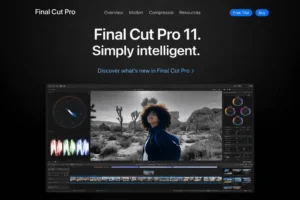
Final Cut Pro remains one of the most powerful video editing tools designed specifically for macOS. Built by Apple, it takes full advantage of Mac hardware and Apple Silicon processors to deliver extremely fast rendering and smooth playback.
One of its standout features is the Magnetic Timeline, which automatically organizes clips and prevents gaps or overlapping layers. This makes complex editing tasks much easier compared to traditional timeline systems.
Final Cut Pro supports high-resolution video formats, including 4K and 8K, and offers professional color grading, motion graphics, and advanced audio tools. While it doesn’t rely heavily on AI enhancements, it is widely trusted by filmmakers, YouTubers, and professional editors for its stability and precision.
For anyone deeply invested in the Apple ecosystem, Final Cut Pro is an excellent professional-grade editing solution.
2. Vmake.ai
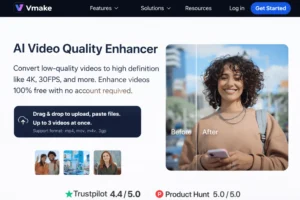
Vmake.ai is an online video enhancement platform that focuses primarily on improving video quality using artificial intelligence. Instead of offering complex editing timelines, this tool concentrates on fixing common video problems automatically.
The AI system can sharpen blurry footage, increase resolution, adjust brightness and contrast, and enhance colors to make videos look cleaner and more professional. This makes it especially useful for improving mobile videos, old recordings, or low-quality footage downloaded from the internet.
Another helpful feature is the Vmake watermark remover, which allows users to create clean videos without unwanted branding.
For creators who want quick improvements without manual editing, Vmake.ai offers a fast and convenient solution powered by AI technology.
3. Adobe Premiere Pro Best Video Editing Tools For Mac
Adobe Premiere Pro is one of the most widely used video editing programs in the creative industry. It is trusted by content creators, production studios, marketers, and filmmakers worldwide.
The software offers a timeline-based editing system, advanced color grading tools, audio editing controls, motion graphics support, and hundreds of effects. One of its biggest strengths is its integration with other Adobe tools like After Effects, Photoshop, and Audition, making it ideal for complex production workflows.
Premiere Pro also supports collaborative editing, cloud projects, and large-scale video production pipelines. While it has a learning curve, it remains a top choice for professionals who need flexibility and advanced editing capabilities.
4. DaVinci Resolve Best Video Editing Tools For Mac
DaVinci Resolve is another professional-level video editing and enhancement application. It is particularly famous for its industry-leading color grading tools, which allow editors to achieve cinematic-quality visuals.
The software provides precise control over exposure, contrast, color balance, skin tones, and dynamic range. This makes it perfect for fixing dull or poorly lit footage and turning it into visually striking video.
Although it relies more on manual adjustments than AI automation, DaVinci Resolve gives editors extremely accurate control over the final output. It also includes video editing, visual effects, motion graphics, and audio post-production in a single platform.
For creators who want detailed control over their visual style, DaVinci Resolve is an outstanding choice.
5. Wondershare Filmora Best Video Editing Tools For Mac
Wondershare Filmora is designed to balance simplicity and creative power. It is particularly popular among beginners and intermediate editors because of its easy drag-and-drop interface and built-in AI features.
Filmora offers a wide range of tools including transitions, filters, motion tracking, color correction, and automatic enhancement features. It also includes AI-powered tools that can remove background noise, stabilize footage, and improve video clarity.
Unlike professional tools that require advanced editing skills, Filmora makes it easier for beginners to produce polished videos without spending hours learning complex workflows.
This combination of ease of use and creative flexibility makes Filmora a strong all-round editing tool for Mac users.
6. InShot
InShot is a lightweight yet powerful Best Video Editing Tools For Mac and app that focuses on quick edits and social media content. While it is widely known as a mobile application, it is extremely useful for creators who need fast editing on the go.
The app includes tools for adjusting brightness, contrast, saturation, and sharpness to improve video quality. It also offers trimming, cropping, transitions, and text overlays—perfect for creating engaging short-form content.
InShot is especially helpful for improving low-quality mobile footage or preparing videos for platforms like Instagram, TikTok, and YouTube Shorts.
For creators who prioritize speed and simplicity, InShot is a practical editing solution.
How to Enhance Videos with Vmake.ai
Enhancing your videos with Vmake.ai is simple and requires only a few steps.
1. Upload Your Video
Visit the Vmake.ai website and upload the video you want to enhance. The platform supports footage from mobile devices, old archives, and online sources.
2. Automatic AI Enhancement
Once uploaded, the AI system automatically analyzes the video and applies improvements. It sharpens details, adjusts lighting and colors, and can upscale resolution up to 4K.
3. Preview the Results
After the enhancement process is complete, you can preview the improved version of your video and make small adjustments if needed.
4. Export the Final Video
Finally, choose your preferred format and export the enhanced video. It will be ready for social media, marketing projects, or personal use.
Final Thoughts: Best Video Editing Tools For Mac
Choosing the right video editing tool depends on your workflow and creative needs. Professional editors may prefer advanced software like Final Cut Pro, Adobe Premiere Pro, or DaVinci Resolve for their extensive editing capabilities.
On the other hand, tools like Filmora and InShot are perfect for beginners who want quick results without complicated processes.
However, when it comes to fast and automatic video enhancement, Vmake.ai stands out. Its AI-powered technology can quickly fix blur, improve colors, increase resolution, and enhance overall video quality without requiring manual editing.
Whether you’re working with smartphone footage or restoring older videos, Vmake.ai offers a simple way to turn ordinary clips into polished, high-quality content.
Homepage: https://worldmacpc.com/
Leave a Reply