

SketchUp Pro
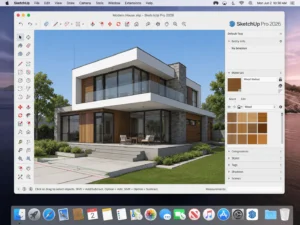
SketchUp Pro for Mac 2026 is the latest and most advanced release of Trimble’s popular 3D modeling software, officially launched in late 2025. Known for its intuitive workflow and powerful design tools, SketchUp continues to be a preferred choice for architects, interior designers, engineers, construction professionals, and 3D modeling enthusiasts.
With the 2026 release, SketchUp Pro introduces significant visual and performance upgrades, including HDRI environments, photorealistic materials, improved IFC export support, and enhanced Live Components. These improvements make SketchUp more competitive for professional architectural workflows while maintaining its trademark ease of use.
Optimized for modern macOS systems and Apple Silicon hardware, SketchUp Pro for Mac 2026 delivers smoother performance, better stability, and improved rendering capabilities compared to previous versions.
This detailed guide covers SketchUp Pro for Mac 2026 features, what’s new, corrected system requirements, advantages, limitations, and final recommendations for users planning to install or upgrade.
Download Free: Malwarebytes for macOS 5.19.1.3534
Key Features of SketchUp Pro for Mac
Intuitive 3D Modeling Workflow
SketchUp’s core strength remains its simple yet powerful modeling system. The push–pull tool allows users to quickly convert 2D shapes into complex 3D geometry. Drawing tools such as lines, arcs, rectangles, and freehand curves enable fast conceptual modeling without technical barriers.
Inference snapping and axis locking ensure precision, making SketchUp suitable for architectural layouts, furniture design, landscaping, and mechanical visualization.
Native macOS and Apple Silicon Optimization
SketchUp Pro for Mac 2026 is officially optimized for macOS Ventura and newer versions. Native Apple Silicon support continues to improve, providing better GPU acceleration, faster viewport rendering, and smoother navigation on M1, M2, and newer chips.
Although Intel Macs are still supported, Apple Silicon systems deliver noticeably better performance in large models and complex scenes.
Layout for Construction Documentation: SketchUp Pro for Mac
SketchUp Pro includes Layout, a professional tool for creating 2D documentation from 3D models. Users can generate scaled floor plans, elevations, sections, and construction drawings directly linked to SketchUp files.
Any changes made to the 3D model automatically update in Layout, reducing revision errors and saving time during project development.
Extension Warehouse Ecosystem
The Extension Warehouse offers thousands of plugins that expand SketchUp’s functionality. Popular extensions include rendering engines, parametric design tools, terrain modeling utilities, energy analysis plugins, and BIM-related add-ons.
SketchUp Pro for Mac 2026 improves compatibility with updated extensions, ensuring smoother workflows for professional users.
3D Warehouse Access
The built-in 3D Warehouse provides millions of ready-made models, including furniture, architectural elements, vehicles, lighting fixtures, and vegetation. This feature significantly reduces modeling time and helps maintain design consistency.
Users can also upload and share their own models, supporting collaborative workflows.
Broad File Format Support
SketchUp Pro supports a wide range of import and export formats, including:
- DWG / DXF
- IFC
- OBJ
- FBX
- 3DS
- COLLADA
This flexibility ensures seamless integration with CAD, BIM, and rendering software used in professional pipelines.
Download Free: CleanMyMac X 5.3.0
What’s New in SketchUp Pro for Mac 2026
The 2026 release focuses heavily on realism, interoperability, and performance.
HDRI Environments (New)
SketchUp 2026 introduces Environments, allowing users to apply HDRI lighting setups directly inside SketchUp. This feature improves scene realism by providing accurate ambient lighting and reflections without relying entirely on external render engines.
Photorealistic Materials
New photoreal material workflows enable better texture depth, surface realism, and lighting interaction. Materials now respond more naturally to environment lighting, enhancing presentation quality directly within the modeling viewport.
Improved IFC Export and BIM Support
IFC export has been significantly improved in SketchUp Pro 2026, making it more reliable for BIM workflows. Architects and engineers can now exchange data more accurately with other BIM platforms while maintaining object hierarchy and metadata.
Live Components Enhancements
Live Components receive major usability upgrades, including better scaling, rotation controls, and parameter editing. These dynamic objects allow users to adjust dimensions and properties in real time without rebuilding geometry.
Performance and Stability Improvements
SketchUp 2026 delivers noticeable performance gains, particularly on Apple Silicon Macs. Viewport responsiveness, scene switching, and shadow calculations are faster, while crash frequency has been reduced compared to earlier releases.
Scene and Workflow Refinements
Scene management has been refined, making it easier to organize views for presentations and documentation. These updates improve productivity for users handling large, multi-scene projects.
System Requirements for SketchUp Pro for Mac 2026
Minimum System Requirements
- Operating System: macOS 13 Ventura or later
- Processor: Apple Silicon or modern Intel processor
- Memory (RAM): 8 GB
- Storage: 1 GB free disk space
- Graphics: macOS-supported GPU
Note: macOS Monterey is not officially recommended for SketchUp 2026 and may result in instability.
Recommended System Requirements SketchUp Pro for Mac
- Operating System: Latest macOS version (Ventura, Sonoma, or newer)
- Processor: Apple Silicon (M1, M2, M3 or later)
- Memory (RAM): 16 GB or more
- Storage: SSD with ample free space
- Graphics: Apple Silicon GPU or high-performance dedicated GPU
Meeting recommended specifications ensures smooth performance when working with large architectural models, HDRI environments, and detailed textures.
Pros and Cons of SketchUp Pro for Mac 2026
Pros
- Easy-to-learn interface with professional capabilities
- Major realism improvements with HDRI environments
- Strong Apple Silicon performance
- Excellent documentation workflow with Layout
- Large extension and 3D model ecosystem
- Improved IFC and BIM interoperability
Cons
- Advanced rendering still depends on third-party plugins
- Not a full BIM replacement for enterprise-level projects
- Large scenes require higher RAM for optimal performance
- Subscription-based licensing may not suit all users
Download Free: A Better Finder Attributes macOS
Conclusion: SketchUp Pro for Mac
SketchUp Pro for Mac 2026 represents a meaningful evolution of the platform, focusing on realism, performance, and professional interoperability. With HDRI environments, photorealistic materials, enhanced IFC exports, and improved Live Components, SketchUp is now better aligned with modern architectural and design workflows.
Optimized for Apple Silicon and modern macOS versions, this release offers improved stability and responsiveness, especially for professionals handling complex 3D projects. When combined with Layout, SketchUp Pro becomes a complete solution for modeling, visualization, and documentation.
For architects, interior designers, students, and creative professionals using macOS, SketchUp Pro for Mac 2026 is a strong, reliable, and future-ready choice.
Homepage: https://worldmacpc.com/
Leave a Reply