

WinZip for Mac
WinZip for Mac 12.0 is a widely trusted file compression and archive management tool used by millions of macOS users worldwide. Designed to simplify file compression, extraction, encryption, and cloud sharing, WinZip has evolved significantly over the years to meet modern macOS standards and user expectations.
As of 2026, the latest version is WinZip for Mac 12.0, which replaces older releases such as version 10.0.6204. Support for WinZip 10 officially ended in November 2025, making it unsuitable for users seeking long-term stability, security updates, and compatibility with newer macOS versions.
This article focuses on the current WinZip for Mac 12.0, covering verified features, recent updates, accurate system requirements, advantages, limitations, and overall usability. The guide is written for all users, including beginners, professionals, and enterprise-level Mac users.
WinRAR for macOS 7.12 RAR for Mac
Key Features of WinZip for Mac 12.0
WinZip for Mac 12.0 offers a mature and feature-rich environment for handling compressed files efficiently while maintaining data security and cross-platform compatibility.
Wide Archive Format Support
WinZip for Mac supports a broad range of compression and extraction formats, allowing seamless file exchange between macOS, Windows, and Linux systems.
Supported formats include:
- ZIP and ZIPX
- RAR (extraction only)
- 7Z
- TAR, GZIP, TGZ
- BZ2
- ISO
This compatibility makes WinZip a practical solution for users who frequently download or share compressed files from different platforms.
Advanced File Encryption and Security
Security remains a core strength of WinZip for Mac. The software supports AES 128-bit and AES 256-bit encryption, enabling users to protect sensitive files with strong password-based security.
Additional security features include:
- Encrypted ZIP archives for secure sharing
- Secure file deletion to prevent data recovery
- Password protection for confidential documents
These capabilities make WinZip suitable for business users, legal professionals, and anyone handling private data.
Native macOS Finder Integration
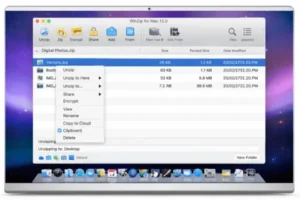
WinZip for Mac integrates directly into the Finder environment, allowing users to compress or extract files using right-click context menus. This eliminates unnecessary steps and improves workflow efficiency.
Key macOS integrations include:
- Drag-and-drop compression
- Finder quick actions
- Retina display optimization
- macOS-style menus and shortcuts
As a result, the software feels consistent with native macOS applications.
Cloud Integration and File Sharing WinZip for Mac 12.0
WinZip for Mac 12.0 supports direct interaction with popular cloud storage services, enabling users to compress, encrypt, and upload files without leaving the application.
Supported cloud services:
- iCloud Drive
- Dropbox
- Google Drive
- Microsoft OneDrive
This functionality is particularly useful for collaboration, backups, and remote work environments.
Malwarebytes for macOS 5.19.1.3534
Batch Processing and File Management WinZip for Mac 12.0
To improve productivity, WinZip allows batch compression and extraction of multiple files and folders. Users can process large datasets efficiently without repeating manual actions.
In addition, built-in file management tools allow users to:
- Rename files inside archives
- Remove unnecessary files
- Preview archive contents before extraction
PDF Tools and Modern Enhancements
Recent versions of WinZip for Mac introduce new productivity-focused features, including:
- PDF preview support directly within the app
- PDF watermarking for document protection
- Duplicate file detection to reduce storage waste
- ZSTD compression support, offering faster compression with better ratios than traditional formats
These additions align WinZip with modern file management expectations.
What’s New in WinZip for Mac (Latest Updates)
WinZip for Mac 12.0 introduces meaningful improvements over earlier versions, particularly compared to the discontinued 10.x releases.
ZSTD Compression Technology
ZSTD (Zstandard) compression is now supported, delivering faster compression speeds and improved efficiency, especially for large files.
Improved Apple Silicon Optimization
While older versions were Intel-focused, WinZip 12.0 is fully optimized for Apple Silicon (M1, M2, M3 and later), resulting in:
- Faster processing
- Reduced CPU usage
- Improved battery efficiency on MacBooks
macOS Sequoia (15) Compatibility
WinZip for Mac 12.0 is officially compatible with the latest macOS versions, including:
- macOS Ventura
- macOS Sonoma
- macOS Sequoia (15)
Stability and Performance Enhancements
- Improved handling of large archives
- Reduced crashes and extraction errors
- Faster app launch and responsiveness
Microsoft Office LTSC Standard for Mac
System Requirements for WinZip for Mac 12.0
The following system requirements are verified from official and trusted sources.
Minimum Requirements
- Operating System: macOS 10.10 or later
- Processor: Intel 64-bit processor
- Memory (RAM): 4 GB
- Storage: Approximately 200–300 MB free disk space
Note: Apple Silicon Macs are supported through native optimization in newer releases.
Recommended Requirements
- Operating System: Latest macOS version
- Processor: Apple Silicon or modern Intel processor
- Memory (RAM): 8 GB or more
- Storage: 1 GB free disk space
Unverified specifications such as USB ports or graphics hardware have been intentionally excluded for accuracy.
Pros and Cons of WinZip for Mac 12.0
Pros
- Trusted and well-established compression software
- Wide archive format compatibility
- Strong AES-256 encryption
- Cloud storage integration
- Apple Silicon and latest macOS support
- Advanced features like ZSTD and PDF tools
Cons
- Paid software with a limited trial version
- Some advanced tools may be unnecessary for casual users
- Fewer customization options compared to some open-source alternatives
Apple Creator Studio macOS
Conclusion: WinZip for Mac 12.0
WinZip for Mac 12.0 is a modern, stable, and professional-grade archive management solution designed for today’s macOS ecosystem. Compared to outdated releases such as version 10.0.6204, the latest version delivers better performance, improved security, Apple Silicon optimization, and compatibility with macOS Sequoia and beyond.
Although it is not free software, the trial version allows users to evaluate its capabilities before purchasing. For users who value reliability, security, and seamless macOS integration, WinZip for Mac 12.0 remains a strong and dependable choice.
Homepage: https://worldmacpc.com/
Leave a Reply