
iDownerGo 10.15.0 for Mac
Download Videos and Music Easily on macOS
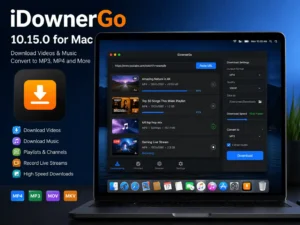
iDownerGo 10.15.0 for Mac is a versatile video downloader and audio converter designed for macOS users. It allows you to save online videos, playlists, and music directly to your computer for offline access. By simply pasting a URL or browsing supported websites within the application, you can choose your preferred format and quality before downloading.
The software is intended for personal offline viewing and listening and should not be considered a replacement for paid streaming services.
What Can You Use iDownerGo For?
iDownerGo 10.15.0 for Mac offers several practical uses for content creators, students, and everyday users:
- Save tutorials, educational videos, and lectures for offline access.
- Download creator content that you have permission to store.
- Extract audio from video pages and convert it into popular music formats.
- Download entire playlists or channels in a single batch.
- Record live streams and watch them later without buffering issues.
How the Download Process Works
The application follows a simple workflow that makes downloading content quick and straightforward.
Step 1: Copy the Video URL
Copy the link from the video, playlist, or channel you want to download. Alternatively, use the built-in browser to locate content directly inside the app.
Step 2: Select Format and Quality
Choose your preferred output format and resolution. Available options may include:
- MP4
- MOV
- MKV
- AVI
- Additional formats depending on your license
Video quality can range from standard HD resolutions up to 4K and 8K when supported by the original source.
Step 3: Start the Download
Click the download button and allow the software to process the content. Once complete, you can open the files in your preferred media player or editing software.
Video Download Features iDownerGo 10.15.0 for Mac
iDownerGo 10.15.0 for Mac includes a wide range of video downloading capabilities for Mac users.
Key Highlights
- Support for over 10,000 video and music websites.
- Compatibility with platforms such as YouTube, Facebook, Instagram, TikTok, Vimeo, Dailymotion, and Bilibili.
- Download resolutions from 720p and 1080p up to 4K and 8K when available.
- Batch downloading of playlists, channels, and multiple videos.
- Live stream recording support from selected platforms.
- Clean, ad-free user experience.
- Watermark-free downloads according to the developer.
Music Download and Conversion Tools
In addition to video downloading,iDownerGo 10.15.0 for Mac provides audio extraction and conversion features.
Audio Features
- Download music from supported online sources.
- Extract audio from video files with a single click.
- Audio quality up to approximately 320 kbps where available.
- Preserve ID3 metadata such as:
- Song title
- Artist name
- Album artwork
- Track information
- Convert files into formats including:
- MP3
- AAC
- M4A
- MP4
- MOV
- AVI
- MKV
Additional Tools and Functions
The software also includes several extra features designed to improve convenience and performance.
Built-In Utilities
- Download acceleration with speeds advertised up to 10× faster.
- Password-protected private mode for secure storage.
- Multi-language user interface.
- Integrated browser for supported websites.
- Quick audio extraction from video URLs.
Licensing and System Requirements iDownerGo 10.15.0 for Mac
iDownerGo 10.15.0 for Mac is commercial software available through subscription and lifetime purchase options. Users can test the application through a free trial before upgrading to a paid plan.
Available License Options
- 1-Month Plan
- 1-Year Plan
- Lifetime License
- Family License
System Requirements iDownerGo 10.15.0 for Mac
- macOS 10.12 or later
- Internet connection for downloading online content
Version 10.15.0 belongs to the current 10.15.x update series. The developer does not provide detailed release notes for every build, so changes between maintenance releases may not be publicly documented.
Important Usage Notice iDownerGo 10.15.0 for Mac
Always ensure that you have permission to download and save content. Some DRM-protected media, subscription-based services, and premium streaming platforms may have restrictions that limit downloading. Before using the software, review the terms of service of the platform involved and comply with applicable local laws.
Download Free: Dehancer Pro 7.3.2 for Final Cut Pro
Final Thoughts: iDownerGo 10.15.0 for Mac
iDownerGo 10.15.0 for Mac combines video downloading, music conversion, playlist management, and live stream recording into a single macOS application. With support for multiple formats, high-resolution downloads, batch processing, and audio extraction tools, it provides a convenient solution for users who need offline access to online media content.
Homepage: https://worldmacpc.com/
Leave a Reply