

RAR Extractor Max for Mac
RAR Extractor Max for Mac: Compressed files are a normal part of modern software workflows, especially in web development and e‑commerce projects. Developers constantly handle Laravel 2026 builds, Symfony packages, WordPress backups and large media archives that all arrive as ZIP or RAR files. For this kind of work, a fast and reliable extraction tool on macOS saves a lot of time.
RAR Extractor Max for Mac is a lightweight archive utility built for users who want a simple and efficient way to open multiple compression formats. It supports common types like ZIP, RAR and 7Z while keeping system performance smooth. Unlike older extraction tools that feel heavy or confusing, this extractor focuses on speed, stability and ease of use, so it works well for both developers and everyday Mac users.
Key features of this archive RAR Extractor Max for Mac
Fast archive extraction
The app is optimized for quick extraction of both small and large archives without noticeably slowing down the system. It is particularly useful when you:
- Unpack Laravel 2026 project packages
- Apply Symfony framework updates
- Install WordPress themes and plugins
- Import e‑commerce store assets
- Extract backend deployment files or backups
Instead of waiting on slow decompression, you can get back to coding or testing more quickly.
Support for multiple archive formats
RAR Extractor Max reduces the need to install several different tools by supporting a wide range of formats, including:
- RAR (single and multi‑part)
- ZIP archives
- 7Z compressed files
- TAR and GZIP
- ISO and BZIP2
This breadth of support makes it suitable for cross‑platform teams where archives may be created on macOS, Windows or Linux servers.
Simple and clean interface RAR Extractor Max for Mac
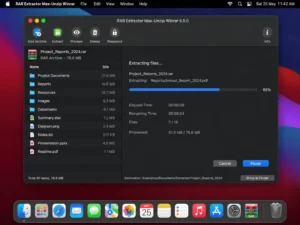
The interface is deliberately minimal, so even new Mac users can figure it out quickly. You can:
- Drag and drop files onto the window or Dock icon to extract
- Open archives directly from Finder
- Preview file lists before unpacking
- Manage several archives in one session
For busy developers and e‑commerce builders, fewer clicks means a faster workflow.
Secure handling of protected archives
Security matters when you work with licensed assets, premium themes or private project backups. The tool supports password‑protected archives, including:
- Encrypted ZIP files
- Protected RAR archives
- Archives using modern AES‑based encryption
This lets you handle client deliverables and confidential resources without switching to another app.
Batch extraction support RAR Extractor Max for Mac
When you have many compressed files to process, batch extraction can save a lot of time. Instead of opening each archive manually, you can extract several at once. This is handy for:
- Website and database backup sets
- Plugin or module bundles
- Large media libraries
- Development project archives from CI pipelines
Batch processing helps keep deployment and restore tasks from becoming repetitive.
Optimized for macOS
The utility is tuned specifically for Apple systems. Benefits include:
- Native support for Apple Silicon chips
- Low memory usage during normal operation
- Fast startup time
- Smooth integration with macOS features and Finder
- Stable performance on recent versions such as macOS Ventura and Sonoma
Because it is designed with macOS in mind, it feels more natural than generic cross‑platform extractors.
Archive preview
Before you commit to extracting a file, you can preview archive contents directly inside the app. This helps you:
- Check project structures
- Locate important files quickly
- Skip archives that are not relevant
- Organize deployment resources more carefully
Previewing first reduces unnecessary file clutter in your project folders.
What’s new in version 9.8.0
Improved performance
Version 9.8.0 brings better extraction speed and responsiveness, especially when you work with large project archives. Long‑running tasks feel smoother, and progress feedback is clearer while the decompression engine is working.
Better compatibility with newer macOS releases
The latest build adds improved support for recent macOS versions, including Ventura and Sonoma, on both Intel and Apple Silicon hardware. This means fewer glitches and a more stable experience when running the extractor alongside modern development tools.
More robust handling of damaged archives
The app now does a better job of dealing with partially corrupted archives. While not every broken file can be recovered, it can often extract the readable parts of ZIP or RAR files, which is useful when downloads were interrupted or backups are incomplete.
User interface refinements
The interface has been polished to feel smoother and more consistent. Navigation panels are clearer, dark‑mode support is improved, and controls respond more quickly, which improves the overall user experience during busy workdays.
System requirements RAR Extractor Max for Mac
Minimum
- macOS 10.13 or later
- Intel or Apple Silicon processor
- 4 GB RAM
- Around 200 MB of free storage
These specs are enough for basic archive extraction on smaller projects.
Recommended RAR Extractor Max for Mac
- macOS Ventura or newer
- Apple M‑series chip (M1 or later)
- 8 GB RAM or more
- SSD storage with comfortable free space
For web developers and e‑commerce builders working with large projects, the recommended configuration ensures the extractor can run alongside IDEs, browsers, Docker containers and databases without slowing down.
Pros and cons RAR Extractor Max for Mac
Pros
- Fast and stable extraction for most common archive formats
- Wide format support, including RAR, ZIP, 7Z and TAR
- Clean macOS‑style interface that is easy to learn
- Supports password‑protected archives for secure work
- Batch processing for multiple archives at once
- Lightweight performance that fits well into developer workflows
Cons
- Limited advanced compression controls for power users
- Some features may be locked behind a premium license, depending on edition
- Available only on macOS, so cross‑platform teams still need other tools on Windows or Linux
How it compares to other archive tools
Against WinRAR
WinRAR remains popular on Windows, but RAR Extractor Max for Mac provides a more native macOS experience with smoother performance and a cleaner UI. You do not need to run Windows‑centric interfaces or compatibility layers just to open archives on a Mac.
Against 7‑Zip RAR Extractor Max for Mac
7‑Zip is powerful and highly configurable, but its interface and official support target other platforms. On macOS, this archive extractor offers simpler navigation and better integration at the cost of fewer low‑level compression options.
Against The Unarchiver
The Unarchiver is a well‑known free solution. RAR Extractor Max focuses on extra convenience features such as batch extraction, archive preview and a slightly more polished interface, which can be helpful when you process many archives every day.
Use cases for developers and e‑commerce builders
Web developers
This Mac archive tool fits naturally into workflows that involve:
- Pulling Laravel 2026 starter projects or demo apps as compressed downloads
- Applying Symfony updates or installing PHP framework bundles
- Unpacking API SDKs, libraries and deployment archives
- Managing WordPress themes and plugin packages
Being able to open these archives quickly reduces friction in your daily development cycle.
E‑commerce builders
Online store developers and managers can use it to handle:
- Bulk product image archives from suppliers or photographers
- Theme and extension bundles for WooCommerce, Shopify or other platforms
- Store backup files and CSV exports
- Marketing asset packs and campaign resources
Clean extraction helps keep media and project folders organized.
General Mac users
Beyond development, it is also handy for:
- Opening document archives
- Extracting downloaded media packs
- Restoring personal backups stored as ZIP or RAR files
Anyone who regularly downloads compressed content on a Mac can benefit from a dedicated extractor.
Download Free: BuhoCleaner 1.16.1 for Mac
Conclusion: RAR Extractor Max for Mac
RAR Extractor Max for Mac is a reliable and lightweight archive utility for macOS users who regularly work with compressed files. It delivers fast extraction, broad format support and secure handling of protected archives while keeping the interface simple.
For developers managing Laravel 2026 projects, Symfony updates or e‑commerce deployments, it helps streamline file management and keeps archive handling from getting in the way of real work. By focusing on the essentials instead of unnecessary complexity, this tool becomes a practical part of everyday Mac workflows.
Homepage: https://worldmacpc.com/
Leave a Reply